
Dev License: This installation of WHMCS is running under a Development License and is not authorized to be used for production use. Please report any cases of abuse to abuse@whmcs.com

How to Delete/Remove a WordPress theme from the WordPress Dashboard? Print

  • 0

We recommended you to remove unused themes. This is a good practice for protecting your WordPress website from vulnerabilities.


1. Login to your WordPress admin dashboard.

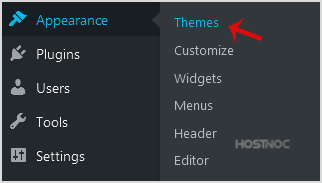
2. Under the dashboard menu, hover your mouse on "Appearance" and then click on "Themes".
wp-dashboard-apperance-themes.gif


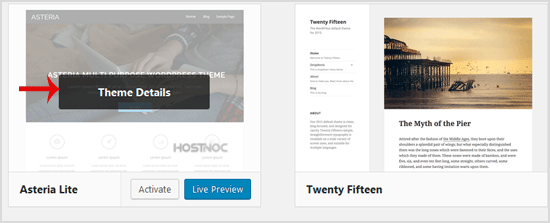
3. Hover your mouse on a theme which is not active and unused or you wish to remove that theme. It will show you the option "Theme Details". Click it.
wp-themes-delete-theme-details.gif


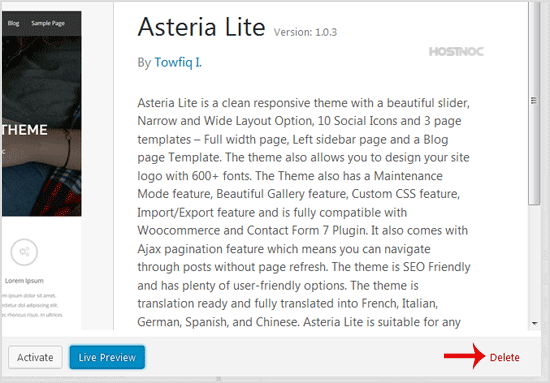
4. A simple window will open. At the bottom area, in the right side of the window, you can see the "Delete" option. Click it!
wp-themes-upload-theme-delete-option.gif


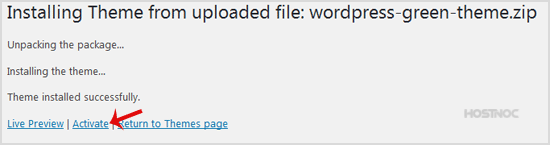
5. A confirmation window will open. Click "OK" to remove your theme.
wp-themes-upload-theme-activated.gif


The theme is successfully removed!


Was this answer helpful?

« Back

Powered by WHMCompleteSolution