
Dev License: This installation of WHMCS is running under a Development License and is not authorized to be used for production use. Please report any cases of abuse to abuse@whmcs.com

How to enable Apache SpamAssassin in cPanel? Print

  • 5

Apache SpamAssassin is a mail filter that identifies spam. It is an intelligent email filter that uses a diverse range of tests to identify unsolicited bulk email, more commonly known as spam. These tests examine email headers and content to classify email with advanced statistical methods.

1. Login to your cPanel Account,
2. In the "Email" section, click on "Apache SpamAssassin" Icon.

 

3. Click on the "Enable Apache SpamAssassin" button.
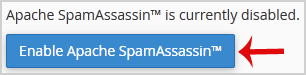


Now, when you receive a spam message with spam score of 5 or more, the spam email will be automatically removed by Spam Assassin.


Was this answer helpful?

« Back

Powered by WHMCompleteSolution